Offline AI transcription · v1.0.7

Your audio, transcribed. Nothing leaves your PC.

Drop in a recording, meeting, lecture, interview or video and get accurate text, subtitles and a Word document in minutes, in about 100 languages. Andromeda Scribe runs entirely on your own computer, so confidential audio never touches a cloud server.

Version 1.0.7 · released 2026-10-08 · Free edition included · No account needed

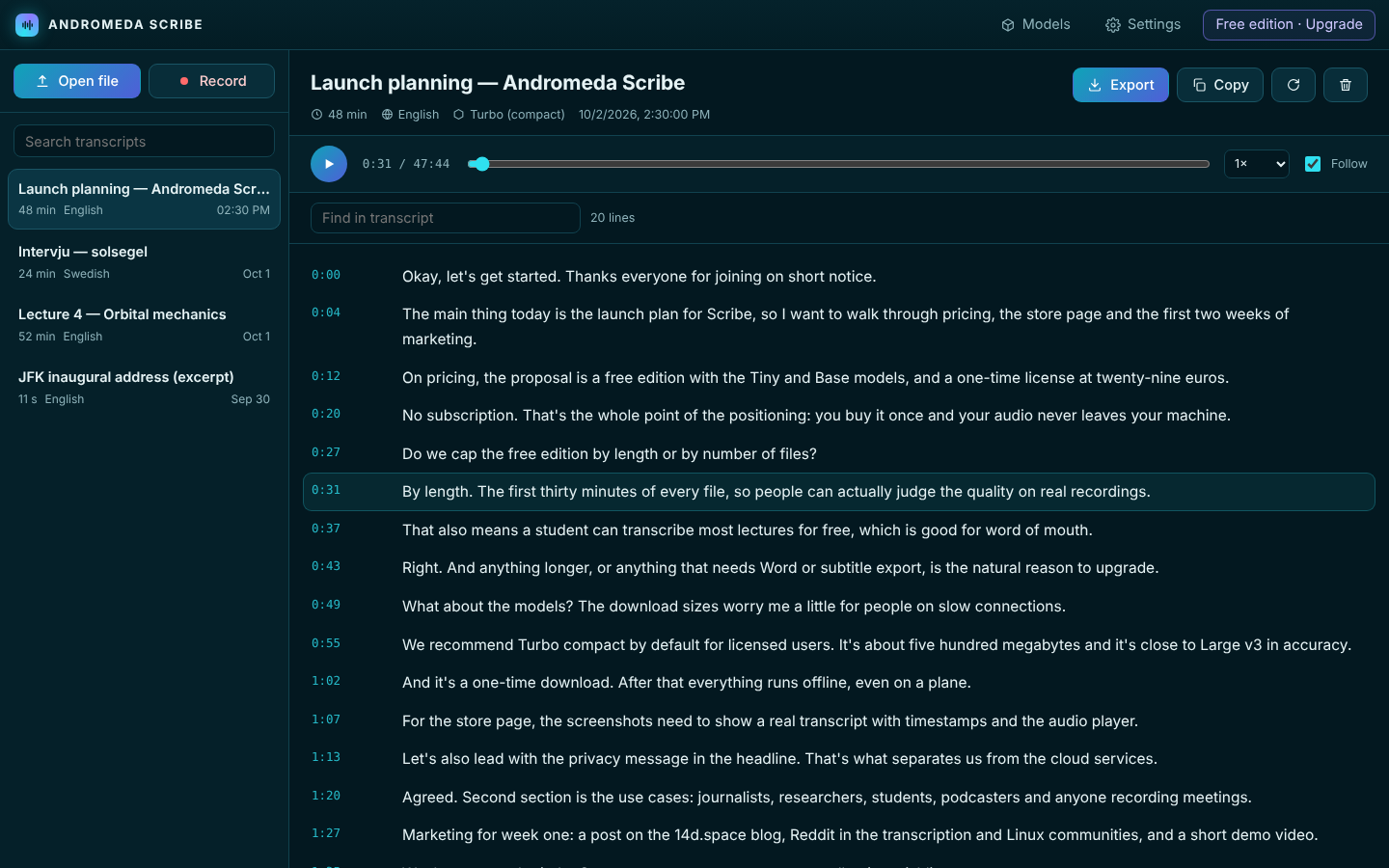
Andromeda Scribe showing a transcript with timestamps next to an audio player

Everything you need to turn speech into text

Built on OpenAI's Whisper speech models, running locally with whisper.cpp, wrapped in an app that is fast to use every day.

Private by design

Transcription happens on your processor. No uploads, no accounts, no minutes to buy. It even works on a plane.

About 100 languages

Automatic language detection, from English, Swedish and Spanish to Japanese and Arabic, plus one-click translation into English.

Record meetings

Record your microphone and, on Windows, the other side of the call too, then transcribe the moment you stop.

Click a line, hear it

Every line is timestamped. Click it to jump the audio there, fix a word in place, and follow along as it plays.

Word, text and Markdown

Export clean documents with timestamps to DOCX, TXT, Markdown or JSON, ready for reports, notes and articles.

Subtitles in minutes

Create SRT and WebVTT subtitles for YouTube, Premiere, DaVinci Resolve or any video player straight from MP4, MKV or MOV files.

Custom vocabulary

Teach it names, products and jargon so they are spelled right the first time.

Pay once

No subscription. One license, three computers, a year of updates, and the app keeps working forever.

Made for people who work with recordings

If you listen back to audio to write things down, Scribe gives you those hours back.

Journalists & interviewsResearchers & focus groupsStudents & lecturesPodcastersYouTubers & video editorsMeetings & minutesConfidential client callsVoice memos & dictation
Drop a file or press Record

MP3, WAV, M4A, FLAC, OGG, MP4, MOV, MKV, WEBM and more.

Pick a model

Fast drafts with Base, or near-perfect text with Turbo and Large v3.

Read, fix and play

The transcript appears line by line while it works.

Export

Word, subtitles or text, saved to your Documents folder.

Pricing

Start free. Upgrade when you want the best accuracy, long recordings and every export format.

Free edition

€0
forever
  • Tiny and Base models
  • First 30 minutes of each file
  • Recording, playback and editing
  • Plain text export
  • Small, Turbo and Large v3 models
  • Word, SRT, VTT, Markdown, JSON
Download

Full license Best value

€29
one-time payment
  • Every model, including Turbo and Large v3
  • Unlimited recording length
  • Word, SRT, VTT, Markdown and JSON export
  • Use it on up to 3 computers
  • One year of updates included
  • Keeps working forever
Buy now

Questions


Is my audio really never uploaded?

Yes. Your recordings are decoded and transcribed on your own computer. The Base speech model is included, so it works offline straight away. The internet is only used to download the larger models (once), to activate a license, and to check for updates.

What do I need to run it?

A 64-bit PC with Windows 10 or 11, or a modern Linux desktop, and a processor from roughly 2015 or newer (AVX2). 8 GB of RAM is plenty for every model; Tiny, Base and Small run fine with 4 GB. On Linux you need WebKitGTK 4.1, which most desktops already have (Ubuntu/Debian: sudo apt install libwebkit2gtk-4.1-0).

How fast is it?

On a typical modern laptop, Base transcribes an hour of audio in a few minutes and Turbo (compact) in roughly 10 to 20 minutes. Faster processors with more cores are quicker. You can keep working while it runs.

How accurate is it?

With the Turbo and Large v3 models, accuracy on clear speech is comparable to the best cloud services. Background noise, crosstalk and heavy accents lower accuracy for every system; the larger models handle them best.

How do I install it?

Windows: extract the zip and run Andromeda Scribe.exe. SmartScreen may ask on first launch: choose "More info → Run anyway". Linux: extract the archive and run ./install.sh to add it to your app menu, or start ./andromeda-scribe directly.

How do I activate my license?

If you buy from inside the app it activates itself as soon as the payment is done. Otherwise paste the key from the thank-you page or your e-mail into Settings → License. Lost your key? Recover it here.

How do I pay?

Checkout is handled by Stripe: cards, Apple Pay, Google Pay and other local methods. One payment, no subscription. It includes a year of updates, and the app keeps working forever with the version you have.

Does it identify different speakers?

Not yet. Speaker labels are on the roadmap. Today you get accurate, timestamped text that you can edit right in the app.