Fall into a black hole.
A black hole on your desk: every pixel follows a light ray through curved spacetime, so the shadow, the photon ring and the disk bent over the top appear by themselves. Set the mass, the spin and the gas, orbit it, then let go.
Free to orbit the hole, change its mass, spin and disk and fall as far as the event horizon, no account needed. Pro and Premium are one-time purchases that unlock the desktop app.
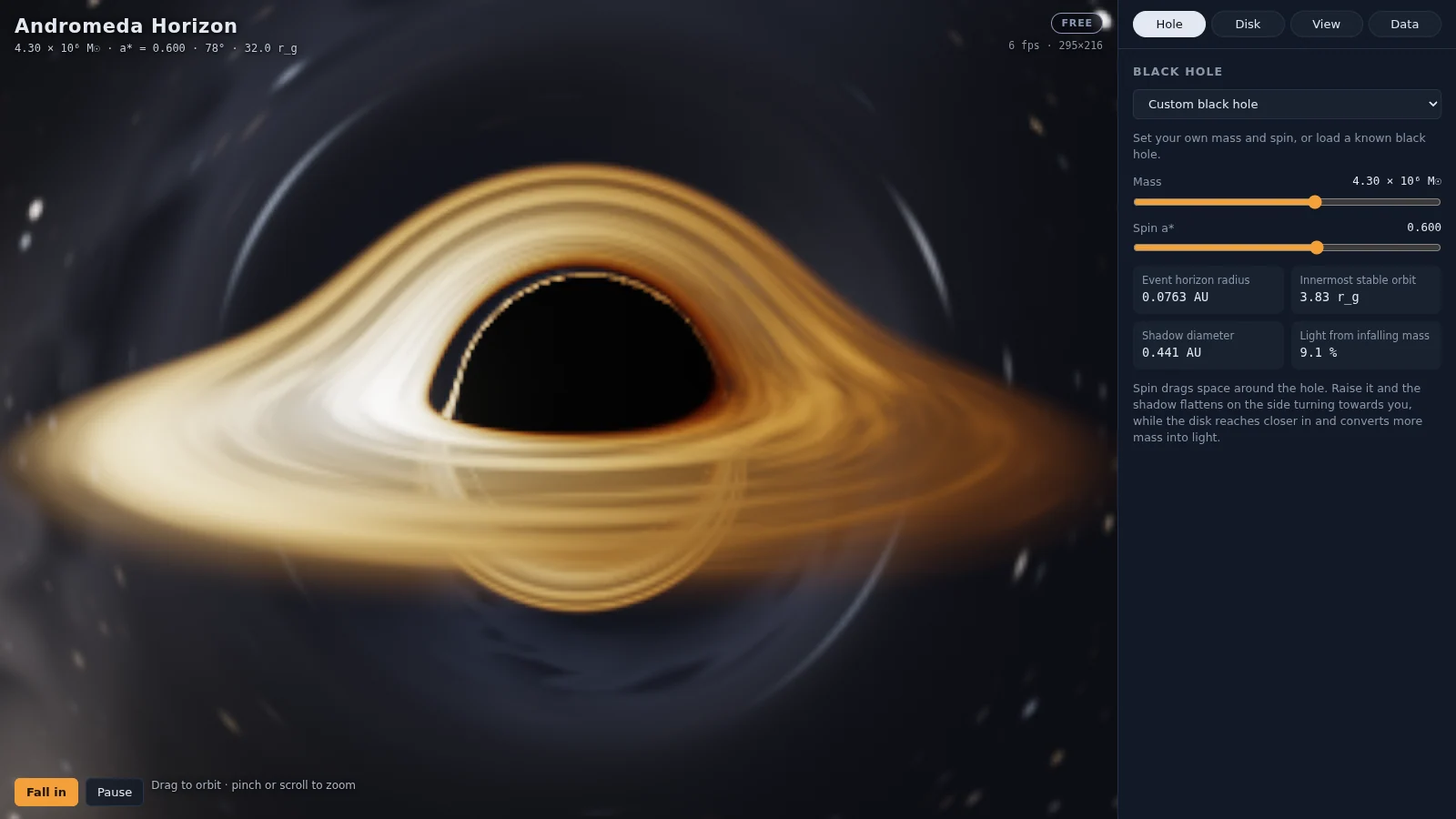
Nothing is painted in. The light is traced.
Every pixel is a light ray
The picture is computed on your graphics card by following a photon for each pixel through the Kerr metric. The shadow, the thin photon ring, the far side of the disk bent over the top and the stars stretched into arcs all come out of that.
A hole that spins
Spin up to 0.998 drags space around the hole: the shadow flattens on the side turning towards you, the disk reaches further in and turns up to a third of the infalling mass into light.
The accretion disk
A thin Novikov–Thorne disk from the innermost stable orbit outwards. The side moving towards you is brighter and bluer, the other dimmer and redder, by the full relativistic shift. Choose the feeding rate and the disk size.
Fall in
Let go and the camera follows a real free-fall path from rest, with the aberration and blueshift of a falling observer and a clock showing your own time to the horizon. Pro crosses the horizon and lets you look back at the universe you left.
Real black holes
From three solar masses to tens of billions. Load Sagittarius A*, and with Pro M87*, Cygnus X-1 and TON 618, with their sizes, luminosities and the apparent size of the shadow from Earth.
Numbers you can check
Horizon, photon orbits, innermost stable orbit, efficiency, luminosity, disk temperature, Hawking temperature and the disk spectrum, with CSV and JSON export for your own work.
Exact light paths, simplified gas.
The light paths and the falling camera use the exact Kerr solution; the app’s tests reproduce the textbook shadow size, orbit radii and the 42° shadow edge seen while crossing the horizon. The gas is simplified and the app says so: the disk has no thickness, its streaks are texture rather than a fluid simulation, and there are no jets. Research images come from general-relativistic magnetohydrodynamics.
What happens to every pixel
ray     = camera frame → photon momentum
H       = ½ gᵘᵛ pᵤ pᵥ  (Kerr–Schild)
step    4th-order Runge–Kutta, adaptive
disk    Novikov–Thorne flux, T ∝ F¼
shift   g = ν_seen / ν_emitted, I ∝ g⁴
sky     lensed stars → bloom → tone map
Pay once. Keep it forever.
Every licence is perpetual and includes a year of updates. Nothing phones home — the app works fully offline.
Free
For curiosity and the classroom.
- Ray-traced spinning black hole
- Mass, spin, accretion rate and disk size
- Fall in as far as the event horizon
- Sagittarius A* preset
- Read-outs and the disk spectrum
Pro Most popular
For students and enthusiasts.
- Fall through the event horizon
- M87*, Cygnus X-1 and TON 618
- Hot spot, grid sky and true-temperature colour
- Sharp render quality
- PNG screenshots and CSV export
Premium
For teachers and creators.
- Everything in Pro
- Maximum render quality
- 4K still renders
- Scene, spectrum and fall-path export (JSON)
- WebM video recording
Your Andromeda Horizon order
Find your purchases and original keys in your account. Sign in with the email used at checkout.
Checking payment and licence delivery…
Open Andromeda Horizon, click the edition badge (top right) or Help → Licence, paste the key and click Activate. The key is checked offline. Keep a copy of the key and your Stripe receipt.
Prices in EUR. Any applicable tax is shown at checkout.
| Free | Pro | Premium | |
|---|---|---|---|
| Ray-traced black hole, disk, lensing and read-outs | ✓ | ✓ | ✓ |
| Fall-in mode as far as the event horizon | ✓ | ✓ | ✓ |
| Crossing the horizon, more black holes, hot spot, backgrounds, true colour | – | ✓ | ✓ |
| Sharp quality, screenshots and CSV export | – | ✓ | ✓ |
| Maximum quality and 4K still renders | – | – | ✓ |
| Full JSON export and video | – | – | ✓ |
Install Andromeda Horizon
One installer for every edition — your licence key unlocks Pro or Premium. The ray tracer needs WebGL 2 and runs best on a dedicated graphics card; on slower graphics it lowers its resolution to stay smooth.
Checking for the latest tested release…
Windows
Windows 10 or 11 · x64 · .exe installer
Windows download unavailableRun the setup file. It adds Andromeda Horizon to the Start menu and desktop. Uninstalling keeps your settings and licence.
Download SHA256 checksums · Verify the file before running it.
Before you install
Is this what a black hole really looks like?
The light bending is exact for a spinning black hole, so the shadow, the photon ring and the warped disk are right. The gas is a simplified thin disk, and colours are shifted into visible light unless you choose true temperature, where real disks glow blue-white, ultraviolet or X-ray.
Does it need an internet connection?
No. Everything runs locally. The desktop app only goes online to check 14d.space for updates.
How do updates work?
Andromeda Horizon checks 14d.space for a newer verified release shortly after it starts and every four hours, and installs it when you close the app (Windows) or the next time you open it (Linux). Only packages signed by 14d.space are accepted.
What happens after the update year?
Your licence keeps working forever with every release from your update year.